(。ゝε・)ノ Follow Me ★.+:。゚☆

☆~ ☆~☆~☆~☆~☆~☆~☆~☆

Jumat, 24 Juni 2011

Hey! Say! JUMP says it’s “OVER” on Music Station!


The boys of Hey! Say! JUMP appeared on the newest episode of Music Station to sing their latest single, “OVER“!
Clad in matching red and black outfits, the group gives a spot-on live of their cool new song.
Check out their performance below the cut!


Thanks To : kurumi

Senin, 20 Juni 2011

How do I get fish into my aquarium in my room?

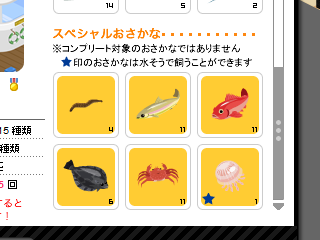
The only fish you can add are special fish with a blue star next to them on the card. Unfortunately, at the moment there's only one you can catch at the moment (a jellyfish, and even he is hard to get!!). You can get him from the fishing area where there is an event going on (it is at the top of the list of places, but right now all the rooms seem to be full all of the time so you'll have to wait a while!) 

Special fish are white and a rainbow appears when you catch them. There are six in that area at the moment, and only one is keepable, as I said. There were more in another fishing area in a previous event last month, but I don't think you can get them anymore, unfortunately. Right now the event area is your only bet.

For 100 ameG, you can buy bait which helps only special fish come to your rod, but if you don't have ameG, you might get lucky and get some of the bait from time to time.

Hope this helps!

[edit]
Here's what the fish look like on the card...


Good luck!


credit to : [info]shinkouchou

Uneven blocks


I think it's probably glitch but no one has found a way to fix it.

Ah. It's basically an illusion. To build this illusion staircase, you need two types of blocks - the one you see in the above picture and the one that is like two of those blocks put together. The bigger cube one.

First, you put one of the small blocks and then you put a big block on top. Then you put a small block on top of the big block. Now this is where it gets tricky. Click onto the small block on top of the big block until the three option bubbles come up. Then, use your keyboard arrows to move it. First use the down arrow and then use the right arrow. Your block will now look like it is on top of the first small block. Afterwards, move the big block off the first small block and onto the second small block. You keep repeating this process until you've used 10 blocks max.

Then you'll start building the new level. This can be tricky sometimes. You have to leave a hole like you see in the above picture because when you go up the stairs, there is not enough space for the person's head to move with it's body upwards. Sometimes it works once and then it doesn't work later so you have to test it a few times. When making the second level, I find it extremely useful to use the arrow keys.

I'm not sure if I explained very well but if you have any problems I can explain it again with pictures or maybe we could meet up on Pigg.

But I hope it all works out for you~! ^-^

Credit : [info]jalela

Play Ameba Pigg

I thought I would start with something basic, but still useful! :D
So we start off with a small My Room FAQ.

So, this is what your room looks like - well more or less.


1. Xの部屋 = X no heya = X's room


2. 自分の部屋へ = jibun no heya e = To your own room
With this button you can return to your own room when you're somewhere else.


3. 今日のきたよ = kyou no kita yo = The one's who came today.
There you can see who visited you and pushed the green "kita yo" button.


With kita yo you can show the other pigg that you were in their room and visited them. 
When you push the button a bell will appear:


The number of kita yos will rise during the day if you're active in the chat rooms.
It's set back to 0 at 12 am. You can push the kita yo button in one room once a day.


4. お知らせ | ピッグの設定 = o-shirase | PIGG no settei = Notifications | PIGG Setup
For o-shirase see No. 7.


5. 今日のグッピグ = kyou no GUPPIGU = Today's Guppigus
I don't really know what Guppigu means, but it's probably something like "Good PIGG". If anyone knows please let me know! <3
This is the "thumb up" button you can push when you click on other PIGGs. It looks like this:

When someone pushes your Guppigu button, stars will appear around you:


I'm not entirely sure, but I think with every 2nd guppigu you receive, you will get one AME (the virtual money on PIGG).

I think many PIGGs just guppigu everyone they see, or the guppigu somone when they like their PIGG. If you want to receive a lot of guppigus, just go around and push everyone's button. Many people will return the guppigu to you.


6. アメ = AME
This is the virtual money on PIGG. You can use AME for the scratch card and for changing face parts.
You can get AME by receving guppigus.
Till now I don't know any other ways to earn AME. D:


7. お知らせ = o-shirase = Notifications
Probably only important if you understand Japanese :D""
If you click on a link you will be forwarded to the official PIGG blog. There you can read the latest news about PIGG. 8D


8. This will pop up if you want to go to a chat room that is already full. You will have to wait in a pending list until it's your turn to enter the chat room. The number shows how many people are before you.
With the キャンセル button you can cancel your request to enter the chat room.


9. 

A) カメラ = KAMERA
With the camera you can take a snapshot of the place you are currently at.

B) おでかけ = odekake
Here you can go to the different chat rooms.

C) ピグとも = PIGUtomo = PIGG friends
This will show you everything about your PIGG friends. You can also search for other PIGGs by entering their ameba ID.

D) きせかえ = kisekae = Change you clothes

E) もようがえ = moyougae = Rearranging (of the furniture)

F) スクラッチ = SUKURATCHI = Scratch
Once a day you can choose a scratch card, pay 20 AME and receive a random item.

G) ショップ = SHOPPU = Shop

H) 持ち物 = mochimono = Posessions
This will list all your posessions, clothes as well as furniture.


10. Your PIGG can perform various emotions.
From left to right there are:

あいさつ = aisatsu = Greeting
おじき = ojiki = Bowing
うれしい = ureshii = Being glad/happy
かなしい = kanashii = Being sad
いらいら = iraira = Being irritated/angry


11. Here you enter what you wanna say. It's limited to 36 characters.
You can send your text by pushing the pink button on the right or by hitting the enter button on your keyboard.
It will appear as a speech bubble above your PIGG.


12. Because it's difficult to follow everything other PIGGs say, because the speech bubbles disappear after a few seconds, 
there's a really useful option right above the field where you enter your text. 
Just click on the field where "チャットの...." is written and you can see the chat history.


Credit to : @distressedcoma (Thanks)